Installation
Requirements
| Requirement | Minimum |
|---|---|
| WordPress | 6.6 |
| PHP | 8.2 |
| Tangible LMS | 0.10.x |
Tangible Quiz is a companion to Tangible LMS, and quizzes surface inside a course as a step resource. Install both.
Installing
- Log in to WP Admin.
- Go to Plugins → Add Plugin → Upload Plugin.
- Upload the Tangible LMS zip, click Install Now, then Activate Plugin.
- Repeat for the Tangible Quiz zip.
Activation order does not matter. Each plugin owns and migrates its own database tables, and the integration between them wires itself up once both are active.
A quiz is not created inside a course. It is its own post type with its own editor, and a course references it. That is what lets one quiz be reused across several courses, the same way any other step resource is reused.
Where the menu appears
Activation adds a Tangible Quiz item to the admin menu.
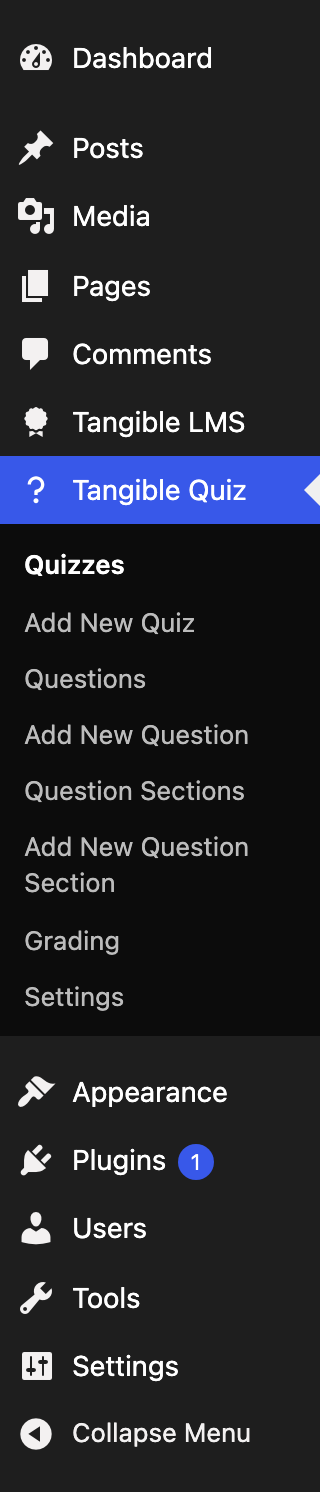
| Menu item | What it is |
|---|---|
| Quizzes | The list of quizzes. |
| Add New Quiz | Creates a quiz and opens its editor. |
| Questions | The central question pool, holding every question on the site independently of any quiz. |
| Add New Question | Creates a question directly, without going through a quiz. |
| Question Sections | Reusable groups of questions, listed once they have been saved from a quiz. |
| Add New Question Section | Creates a section directly. |
| Grading | Grading across every quiz: the attempts listing and the grading view, for users who can manage grading. See grading in WP Admin. |
| Settings | A link through to the site-wide quiz settings under core Settings. |
Note that questions and question sections are top-level entities, not children of a quiz. A question built inside one quiz lands in the shared pool and can be pulled into another.
Roles and permissions
Quiz authoring follows manage_options (administrators) for the settings page, and the quiz post type's own capabilities for the editor. In practice, administrators can do everything; editors can author quizzes and questions; authors, contributors, and subscribers have no quiz-building access by default.
For the detailed capability model on the LMS side, which follows the same shape, see roles and permissions.