The grading queue
Extended-text and upload questions cannot be marked automatically. Their attempts close without a verdict and wait for a person. The grading queue is where a grader finds them.
This page covers the front-end queue that graders and mentors work from. Site administrators and grading managers also get a WP Admin surface across every quiz: see grading in WP Admin.
Placing the queue
The queue is a front-end surface, not a WP Admin screen. Put it on any page with the shortcode:
[tangible_quiz_grading_list]
There is one attribute, width, because the table is wide and a block theme's constrained layout would otherwise squeeze it into the content column:
| Value | Effect |
|---|---|
wide | The theme's own alignwide breakout. The default. |
full | The theme's alignfull breakout. |
default | Stays in the content column. |
[tangible_quiz_grading_list width="full"]
These ride the theme's existing layout classes, so no theme changes are needed, and they are harmless on a classic theme that has no such layout.
Who sees it
Access is decided per viewer, on render, and the two audiences without access are treated differently:
- A guest gets nothing at all. A signed-out visitor on a public page has no queue to be refused, and the host page stays clean.
- A signed-in user without grading rights is told so, with a card saying they don't have access. Unlike the guest, this person has an account and someone to ask about it. The same card answers a stale per-attempt link, rendered inside the theme with the site's navigation around it.
Two kinds of user get a queue:
- Capability graders hold the grading capability outright and see everything.
- Host-granted graders are given specific quizzes by whatever plugin is hosting. The LMS grants course mentors the quizzes embedded in the courses they actively mentor, so a mentor's queue is scoped to their own courses.
Rendering nothing is a courtesy to the host page. The REST API is the real boundary: a user who reaches a grading URL directly is still checked there.
Reading the queue
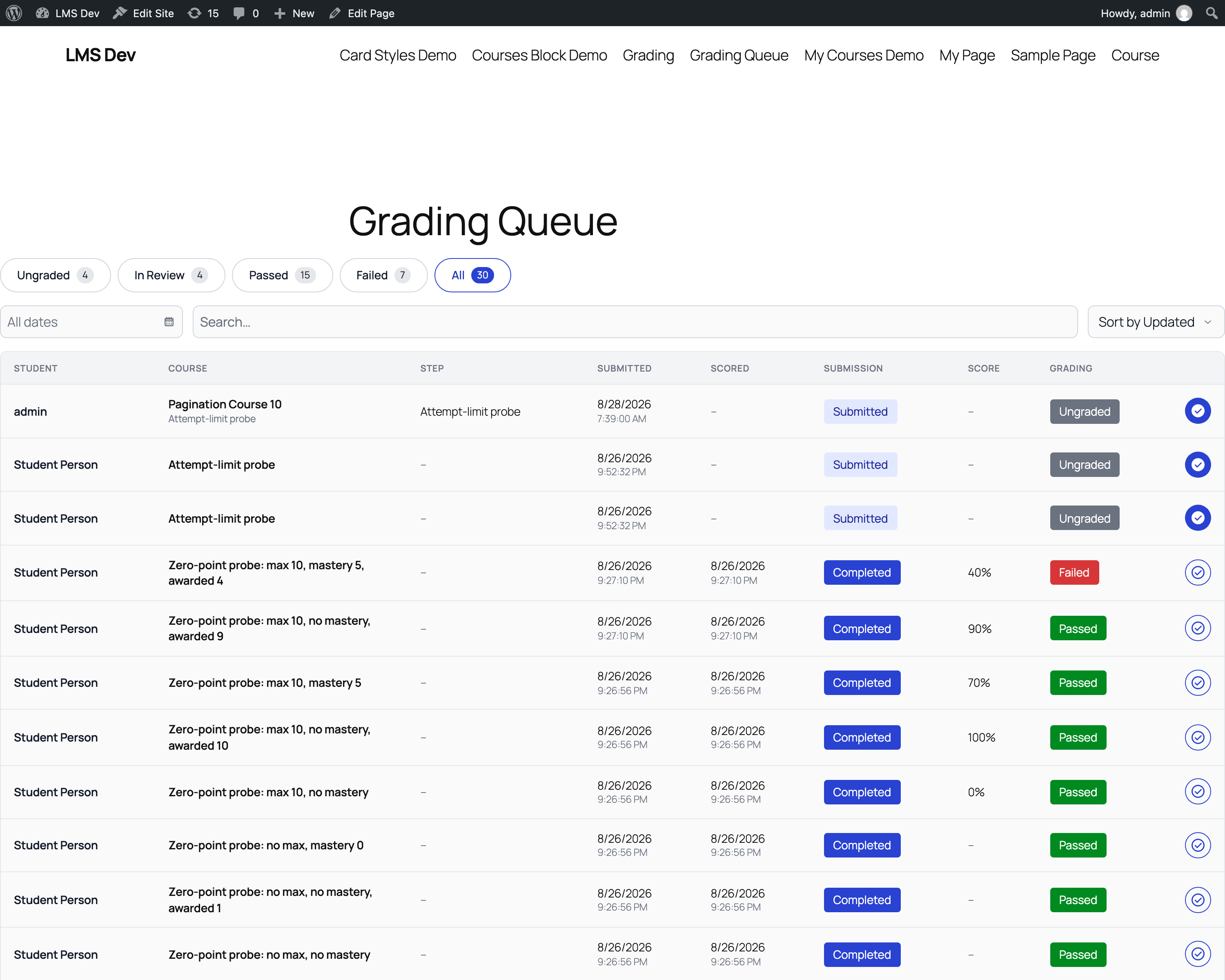
Filter pills across the top carry live counts:
| Filter | Shows |
|---|---|
| Ungraded | Submitted, nobody has started marking it. |
| In Review | Grading has begun but is not settled. |
| Passed | Graded and passed. |
| Failed | Graded and failed. |
| All | Everything in scope. |
Below them, a date-range control (with quick ranges), a student search, and a sort: Updated, Submitted, or Scored.
The table columns:
| Column | What it shows |
|---|---|
| Student | The candidate. |
| Course | The course the quiz sits in, with the quiz beneath it. |
| Step | The course step embedding the quiz. |
| Submitted | When the candidate submitted. |
| Scored | When it was graded, or –. |
| Submission | Submitted or Completed. |
| Score | The percentage, once there is one. |
| Grading | Ungraded, Passed, or Failed. |
The queue loads twenty rows at a time, with Load more at the foot.
An empty result keeps the table and says which kind of empty it is: Nothing found ("No attempts match these filters.") when the filters exclude everything, and Nothing to grade ("Submitted attempts appear here as they arrive.") when the queue is genuinely clear.
Those two columns are answered by whatever plugin embeds the quiz. With the LMS present, each attempt resolves to the course and step the candidate met it in. Without a host answering, the columns fall back to the quiz title alone: quizzes used outside a course show – under Step, which is expected rather than a fault.
Opening an attempt
The button at the end of each row opens the grading view, labelled for the row's state: Grade Quiz for untouched work, Resume Grading for something part-marked, Review Grading for something already settled.
The queue passes its own address along, so Back to Grading in the grading view returns you to the page you started from rather than a generic screen.